Are you frustrated by your GPS showing the wrong speed? It can be confusing and even dangerous if you rely on it while driving or biking.
Your GPS should give you accurate speed readings, but sometimes it doesn’t. The good news is, you don’t have to live with this problem. You will discover simple and effective ways to fix inaccurate speed readings on your GPS. By the end, you’ll feel confident that your device is telling you the truth every time you check your speed.
Keep reading to learn how to take control of your GPS and get the accurate information you deserve.
Credit: www.polestar-forum.com
Common Causes Of Inaccurate Gps Speed
Inaccurate GPS speed readings can be frustrating, especially when you rely on your device for navigation or tracking your workouts. Understanding the common causes behind these errors can help you spot the problem quickly and fix it effectively. Let’s break down why your GPS might be giving you wrong speed data.
Satellite Signal Obstruction
Buildings, trees, tunnels, and even heavy cloud cover can block or weaken GPS signals. When your device struggles to get a clear connection to enough satellites, speed readings can jump around or freeze. Have you noticed your speedometer acting up in dense city streets or forest trails? That’s a classic sign of signal obstruction.
Device Hardware Limitations
Not all GPS receivers are created equal. Older or budget devices might have less accurate chips or antennas that affect speed accuracy. Your smartphone’s GPS might lag compared to a dedicated GPS watch designed for runners. Ask yourself if your device matches the precision you need for your activities.
Software And Firmware Glitches
Software bugs or outdated firmware can cause your GPS speed to display incorrectly. Sometimes, an app update fixes these issues, but other times you need to restart or recalibrate your device. Have you checked for updates or tried resetting your GPS app recently?
Incorrect Gps Settings
Settings like sampling rate or power-saving modes influence how often your device updates speed data. If the GPS updates less frequently, speed readings become less smooth and more prone to errors. Take a moment to review your GPS settings—are you prioritizing battery life over accuracy?
Environmental Factors And Movement Patterns
Sudden stops, sharp turns, or erratic movement can confuse GPS algorithms trying to calculate speed. Even changes in altitude or crossing bridges can cause brief inaccuracies. Think about your last trip—did you experience any unusual speed jumps during sharp corners or quick stops?
Checking Gps Device Settings
Checking your GPS device settings is a simple yet often overlooked way to fix inaccurate speed readings. Many users forget that incorrect settings can skew the data your device shows. By reviewing these settings, you can quickly identify and correct errors without needing extra tools or apps.
Ensuring Correct Units
Speed readings depend on the units your GPS device uses—miles per hour (mph) or kilometers per hour (km/h). If your device is set to km/h but you expect mph, the numbers will seem off.
Check your device’s settings menu for the unit option. Switch to the unit you are familiar with, and see if the speed reading feels more accurate.
Have you ever noticed your speed reading seemed too fast or slow simply because of unit confusion? Adjusting this setting often fixes the issue instantly.
Calibrating The Device
Some GPS devices require calibration to ensure accurate speed tracking. Calibration aligns the device’s sensors with actual movement and can fix discrepancies.
Look for a calibration option in the settings or user manual. Follow instructions carefully, which may involve walking a set distance or driving at a steady speed.
If your speed readings jump around wildly, calibration could stabilize them. How often do you calibrate your device? Regular calibration can prevent speed errors before they start.
Updating Gps Software
Updating GPS software is crucial for maintaining accurate speed readings. GPS devices rely on software to process satellite signals correctly. Outdated software may cause errors in speed calculations and other functions. Regular updates fix bugs and improve device performance. They ensure your GPS works with the latest satellite data and mapping information.
Importance Of Regular Updates
Regular updates improve the accuracy of GPS speed readings. They fix known issues and enhance signal processing. Updates also add new features and security patches. Without updates, your device may lag behind in technology. This leads to slower response times and incorrect data. Keeping your GPS software current helps avoid these problems.
How To Update Your Device
Start by connecting your GPS device to a computer or Wi-Fi. Visit the official website or use the device’s update app. Follow instructions carefully to download and install the latest software. Make sure the device has enough battery or stay plugged in. After updating, restart the device to apply changes. Check speed readings again for improved accuracy.

Credit: www.reddit.com
Improving Gps Signal Strength
Improving GPS signal strength is key to fixing inaccurate speed readings. A strong signal helps your GPS device track location more precisely. Weak signals cause delays and errors in speed data. You can enhance your GPS experience by reducing obstacles and boosting the signal power.
Avoiding Obstructions
Obstructions block GPS signals and lower accuracy. Buildings, trees, and mountains can cause signal loss. Try to stay in open areas with a clear sky view. Avoid tall structures that can interfere with satellite signals.
Inside vehicles, metal roofs and tinted windows can weaken GPS signals. Position your device near a window to improve reception. Keep the GPS antenna free from covers or objects that block signals.
Using Signal Boosters
Signal boosters amplify weak GPS signals. They capture and strengthen satellite data for better accuracy. Many boosters work well in cars, boats, and remote areas.
Choose a booster compatible with your GPS device. Install it where it can receive signals clearly. This can reduce errors in speed readings and improve tracking reliability.
Comparing With Other Speed Measurement Tools
Comparing your GPS speed readings with other speed measurement tools can help you identify if the issue lies with your device or external factors. Sometimes, GPS inaccuracies occur due to signal interference or outdated software. By cross-checking with reliable tools, you can better understand where the discrepancy comes from and take appropriate action.
Using Car Speedometer
Your car’s built-in speedometer is a quick and easy way to check GPS speed accuracy. Although car speedometers are not perfectly precise, they usually offer a close estimate of your actual speed. Try comparing your GPS reading with the speedometer while driving on a straight road without heavy traffic.
Keep in mind that car speedometers can also have slight errors, often showing a bit higher than your real speed due to safety regulations. If your GPS reading is significantly off compared to the speedometer, it might indicate a GPS issue. Have you noticed your GPS speed fluctuating more than your car’s speedometer?
Mobile App Alternatives
There are many mobile apps designed to measure speed using different technologies like GPS, cellular data, or even accelerometers. Testing your speed against multiple apps can reveal if your primary GPS device is the problem. Apps like SpeedView, Ulysse Speedometer, or DigiHUD can provide alternative speed readings.
When you test these apps, try to keep your route and conditions the same. Notice if the speed readings vary between apps or if they consistently differ from your GPS device. This comparison helps you decide if you need to update your GPS software, recalibrate your device, or switch to a different tool altogether.
Troubleshooting Hardware Issues
Troubleshooting hardware issues is essential for fixing inaccurate speed readings on a GPS device. Hardware problems often cause faulty data, making the GPS unreliable. Identifying and addressing these issues can restore accurate speed tracking. Start by carefully inspecting the physical parts. Then, consider replacing any components that no longer work properly. This approach ensures the GPS device functions correctly and provides precise speed information.
Checking For Physical Damage
Physical damage can disrupt GPS performance. Examine the device for cracks, dents, or broken parts. Look closely at the antenna and connectors, as damage here affects signal strength. Check cables for cuts or frays. Moisture or dirt inside the device can also cause errors. Clean the device gently using a soft cloth. Avoid using water or harsh chemicals. Ensure all ports and covers fit tightly. Damaged parts might need professional repair or replacement.
Replacing Faulty Components
Faulty components cause inaccurate speed readings. Common parts to check include the GPS antenna, battery, and circuit board. Replace the antenna if the device loses signal frequently. A weak or old battery can cause erratic performance. Use only compatible batteries recommended by the manufacturer. Circuit board issues may require expert help. Use original or certified replacement parts. Installing the right components improves the device’s accuracy and reliability.
Consulting Manufacturer Support
When your GPS shows inaccurate speed readings, reaching out to the device’s manufacturer can be a smart move. They have the technical knowledge and tools to diagnose deeper issues that simple troubleshooting can’t fix. You might discover that the problem is a known glitch or something requiring a firmware update or hardware check.
Contacting Customer Service
Start by visiting the manufacturer’s official website to find their customer service contact details. Many brands offer live chat, email, or phone support tailored to your region. Have your device model number and purchase details ready to speed up the process.
Don’t hesitate to ask specific questions about your speed reading issue. Mention when the problem started and if it happens consistently or only sometimes. Clear communication can help the support team provide precise advice or solutions.
Finding Official Repair Centers
If customer service suggests a hardware problem, locating an authorized repair center is crucial. Repairs done by unofficial technicians might void your warranty or cause further damage. Official centers use genuine parts and follow manufacturer guidelines.
You can usually find repair locations on the manufacturer’s website, listed by country or city. Some brands also offer mail-in repair services, which is convenient if no center is nearby. Checking reviews or asking customer service about the repair center’s reputation can save you from a bad experience.
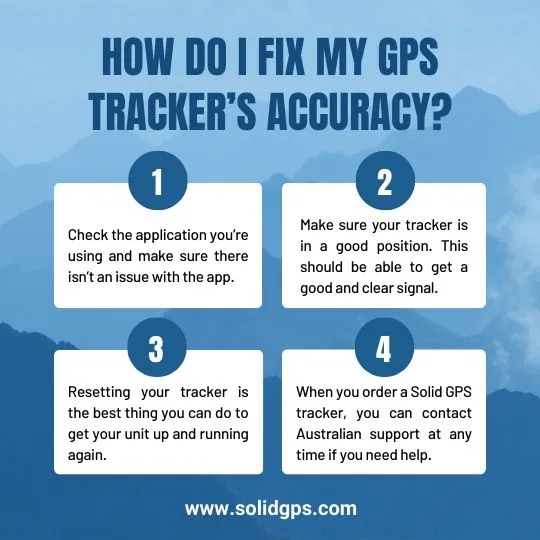
Credit: www.solidgps.com
Frequently Asked Questions
Why Is My Gps Speed Reading Inaccurate?
GPS speed inaccuracies often result from weak satellite signals or environmental interference. Obstacles like tall buildings or dense trees can block signals. Also, outdated GPS software or hardware may cause errors. Regular updates and clear views of the sky help improve accuracy.
How Can I Calibrate My Gps For Better Speed Readings?
Calibrate your GPS by restarting the device and updating its software. Ensure your location settings are set to high accuracy. Use GPS calibration apps if available. Driving at a constant speed in an open area can also help the GPS recalibrate effectively.
Does Phone Gps Differ From Standalone Gps Units In Accuracy?
Yes, standalone GPS units usually have better antennas and sensors, providing more accurate speed readings. Phone GPS accuracy depends on model, software, and environmental factors. However, modern smartphones with updated apps and clear skies can offer reliable speed data.
Can Gps Speed Errors Be Fixed By Changing Settings?
Yes, adjusting GPS settings like enabling high accuracy mode can reduce errors. Turning off battery saver modes helps maintain consistent GPS performance. Also, clearing cache and data of GPS apps can improve speed reading precision.
Conclusion
Fixing inaccurate GPS speed readings can save time and frustration. Check your device’s settings and update the software regularly. Clear any obstructions around the GPS antenna for better signals. Restart the device to refresh its connection. Use GPS apps that are known for accuracy.
Remember, simple steps often improve speed readings the most. Stay patient and test your GPS after changes. Accurate speed helps with safe and smooth travel. Keep these tips in mind to get reliable GPS data every time.