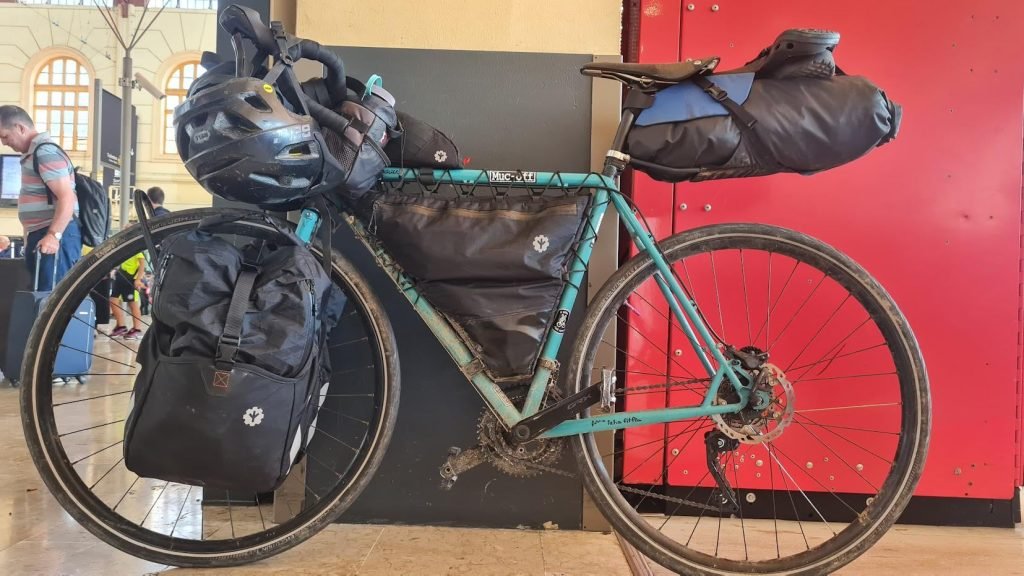
Carrying your laptop while bikepacking can feel tricky. You want to keep it safe, dry, and ready to use, but the bumps and turns of the road make that a challenge.
If you’ve ever worried about damaging your laptop or struggled to find the right way to pack it, this guide is for you. You’ll discover simple, practical tips that protect your device and make your ride smoother. Keep reading to learn how to carry your laptop safely, so you can enjoy your adventure without the stress.
Choosing The Right Laptop Bag
Carrying a laptop while bikepacking needs care. Picking the right bag keeps your laptop safe and dry. It also makes riding more comfortable.
This guide covers key points to help you choose a good laptop bag. Focus on bag style, materials, and protection inside the bag.
Backpack Vs. Messenger Bag
A backpack spreads weight across both shoulders. It feels balanced and is good for long rides. Messenger bags hang on one shoulder. They are easier to reach while riding but may feel uneven.
- Backpacks offer better weight distribution.
- Messenger bags allow quick laptop access.
- Backpacks usually have more storage space.
- Messenger bags can be lighter and less bulky.
Waterproof Materials
Water can damage your laptop quickly. Choose bags made from waterproof materials. Look for coated fabrics or rain covers. Sealed seams stop water from leaking in.
| Material | Water Resistance | Durability |
| Nylon with PU coating | High | Good |
| Tarpaulin | Very High | Very Good |
| Canvas (waxed) | Medium | Good |
| Polyester | High | Fair |
Padded Compartments
Padded compartments protect your laptop from bumps and drops. Soft foam lining cushions the device. Some bags have adjustable dividers to fit different laptop sizes.
Check for these features in padded compartments:
- Thick foam padding around all sides
- Secure straps or closures to hold the laptop
- Separate space from other items to avoid scratches

Credit: www.reddit.com
Securing Your Laptop Inside The Bag
Carrying a laptop while bikepacking needs care. You must protect it from shocks and weather. A good setup keeps the laptop safe and easy to reach.
Focus on how to secure your laptop well. Use the right sleeves, organize accessories smartly, and reduce movement inside the bag.
Using Protective Sleeves
Protective sleeves shield your laptop from bumps and scratches. They add a layer of padding that absorbs shocks. Choose sleeves made of thick neoprene or padded fabric.
- Pick sleeves that fit your laptop size exactly.
- Look for water-resistant materials to keep moisture out.
- Use sleeves with soft inner lining to avoid scratches.
- Some sleeves have extra pockets for cables and small items.
Organizing Accessories
Keep laptop accessories separate to avoid damage. Chargers, cables, and mice can scratch or press on your laptop. Organize them neatly in compartments or pouches.
| Accessory | Storage Tips |
| Charger | Wrap cables loosely and place in a small pouch |
| Mouse | Use a padded compartment or case |
| USB Drives | Keep in a zippered pocket to avoid loss |
Minimizing Movement
Movement inside the bag can harm your laptop. Use padding or dividers to keep it snug. Fill empty spaces to stop the laptop from shifting during the ride.
Tips to Minimize Movement:
- Place foam or soft cloth around the laptop.
- Use adjustable straps inside the bag to hold the laptop tight.
- Store soft items like clothes near the laptop for extra padding.
- Keep heavier items away from the laptop to avoid pressure.
Mounting Options For Bikepacking
Carrying a laptop safely on a bikepacking trip needs good mounting choices. You want your laptop to stay dry and secure.
Different bags and racks fit on your bike in various ways. Each option has benefits for protecting your laptop.
Frame Bags
Frame bags fit inside the main triangle of your bike frame. They keep weight low and balanced for better riding.
Choose a padded frame bag to protect your laptop from bumps. Make sure it fits your laptop size well.
- Keep the bag tight to avoid movement
- Use waterproof bags to protect against rain
- Pack your laptop with extra padding inside the bag
Handlebar Bags
Handlebar bags attach to the front of your bike. They offer easy access to your laptop while riding.
Pick a handlebar bag with good padding and a firm attachment. This helps keep your laptop safe on rough trails.
- Check the bag’s weight limit and size
- Use waterproof covers if the bag is not water resistant
- Secure the bag tightly to avoid swinging
Rear Racks And Panniers
Rear racks hold panniers on the back of your bike. Panniers offer large storage space and good protection.
Use padded laptop sleeves inside panniers for extra safety. Make sure the panniers are waterproof or use rain covers.
- Distribute weight evenly on both sides
- Choose panniers with secure closures
- Check rack compatibility with your bike

Credit: www.reddit.com
Balancing Weight And Comfort
Carrying a laptop safely while bikepacking needs careful planning. You must balance weight and comfort to avoid injury.
Good weight distribution and proper fit help keep you comfortable on long rides. This guide shows how to do it well.
Distributing Load Evenly
Keep the laptop weight balanced to avoid straining your back. Put heavier items close to your body.
Use a backpack or bike bag with compartments to spread the load. This stops the bag from pulling to one side.
- Place the laptop in a padded compartment near your back
- Pack other items around the laptop for support
- Keep the weight centered for better bike control
Adjusting Straps And Fit
Adjust your straps to keep the bag tight but comfortable. Loose straps make the bag move and hurt your shoulders.
Check the fit before you start riding. The bag should sit high on your back and not hang low.
- Tighten shoulder straps evenly on both sides
- Use chest or waist straps for extra support
- Make sure the bag does not bounce when you move
Avoiding Strain And Fatigue
Take breaks often to reduce fatigue from carrying weight. Change your riding position to ease pressure points.
Use padding inside the bag to protect your laptop and soften the load on your body.
- Stop regularly to rest your shoulders and back
- Shift the bag slightly to change pressure spots
- Use padded straps and back panels for comfort
Protecting Against Weather And Impact
Carrying a laptop safely while bikepacking is important. Rain, bumps, and dust can harm your device. You need to protect it well during your ride.
Using the right gear and methods helps keep your laptop safe. This guide covers weather protection and impact safety.
Rain Covers And Waterproofing
Rain covers shield your laptop bag from water. They stop rain from soaking your laptop. Waterproof bags add extra protection by keeping water out completely.
Look for rain covers made of durable, water-resistant fabric. Use waterproof laptop sleeves inside your bag for double safety.
- Choose rain covers that fit your bag snugly
- Use waterproof laptop sleeves or cases
- Check for sealed zippers on bags
- Dry your bag and covers after wet rides
Shock Absorption Techniques
Shock absorption lowers damage from bumps and drops. Use padded laptop bags or cases to protect your device. Soft foam or gel padding works well.
Secure your laptop tightly inside the bag. This stops it from moving during the ride. Place the laptop in the middle of your load to avoid impact.
- Use padded sleeves or laptop bags
- Choose bags with shock-absorbing foam
- Keep the laptop centered in your pack
- Use straps or compartments to hold it firmly
Avoiding Dust And Dirt
Dust and dirt can damage laptop ports and screens. Keep your laptop inside a closed bag or case. Clean your bag regularly to avoid buildup.
Use dust covers or zippered compartments to protect your device. Avoid placing the laptop on dirty surfaces during stops.
- Store laptop in sealed compartments
- Use dust covers or zippered sleeves
- Clean your bag often
- Keep laptop off the ground

Credit: www.reddit.com
Tips For Handling Your Laptop On The Road
Carrying a laptop while bikepacking needs care. Your laptop must stay safe from bumps and weather.
This guide helps you protect your laptop during your ride. Follow these tips for better handling.
Safe Packing And Unpacking
Pack your laptop in a padded sleeve. This protects it from shocks and scratches.
Use a waterproof bag or cover to keep your laptop dry. Avoid placing heavy items on top of it.
- Choose a sleeve with soft padding
- Place the laptop upright in your bag
- Keep liquids away from your laptop area
- Unpack carefully on stable surfaces
Regular Checks During Rides
Stop often to check your laptop’s position. Make sure it is secure and protected.
Look for any signs of damage or moisture. Fix any issues before you continue your trip.
- Check the bag straps and zippers
- Feel for any dampness inside the bag
- Ensure padding is in place
- Adjust your packing if needed
Using Laptop Breaks Wisely
Use breaks to give your laptop some rest. Avoid leaving it in direct sun or cold weather.
Find a shaded and dry spot to use or check your laptop. This helps keep it safe and cool.
- Turn off your laptop if not in use
- Keep it in its sleeve during breaks
- Use breaks to clean your laptop gently
- Store it away from dust and dirt
Frequently Asked Questions
How Can I Protect My Laptop From Shocks While Bikepacking?
Use a padded laptop sleeve or case to absorb shocks. Secure it tightly inside a backpack with cushioning. Avoid loose placement to reduce damage risk during bumpy rides.
What’s The Best Backpack Type For Carrying A Laptop Biking?
Choose a waterproof, padded backpack with dedicated laptop compartments. Look for ergonomic designs that distribute weight evenly. This ensures comfort and laptop safety on long bikepacking trips.
Can I Carry A Laptop On Bike Racks Safely?
Yes, but only with proper protective casing. Use waterproof, shockproof bags designed for bike racks. Secure the bag firmly to prevent movement and damage during rides.
Should I Remove My Laptop Battery Before Bikepacking?
No need to remove the battery unless recommended by the manufacturer. Keep your laptop powered off to prevent damage. Removing batteries can cause inconvenience and isn’t typically necessary.
Conclusion
Carrying a laptop safely while bikepacking is crucial. Use a waterproof, cushioned bag. Secure it well to your bike. Regularly check for stability and balance. Avoid bumpy roads when possible. Keep your device dry and protected. Always plan your packing strategy.
Balance weight for a smoother ride. Protecting your laptop means longer device life. Enjoy your bikepacking adventure with peace of mind. Safe travels!